Pinterest is no longer just a social media platform; it has evolved into a powerful visual search engine where the algorithm prioritizes precision, quality, and specific dimensions. If you are aiming to rank in highly competitive markets like the USA, UK, and Canada, understanding Pinterest Image Sizes 2026 is your first step toward viral success. Western audiences are accustomed to high-definition, “pixel-perfect” content, and even a slight deviation from standard aspect ratios can cause the algorithm to suppress your reach.
Why Following a Pinterest Aspect Ratio Guide is Essential
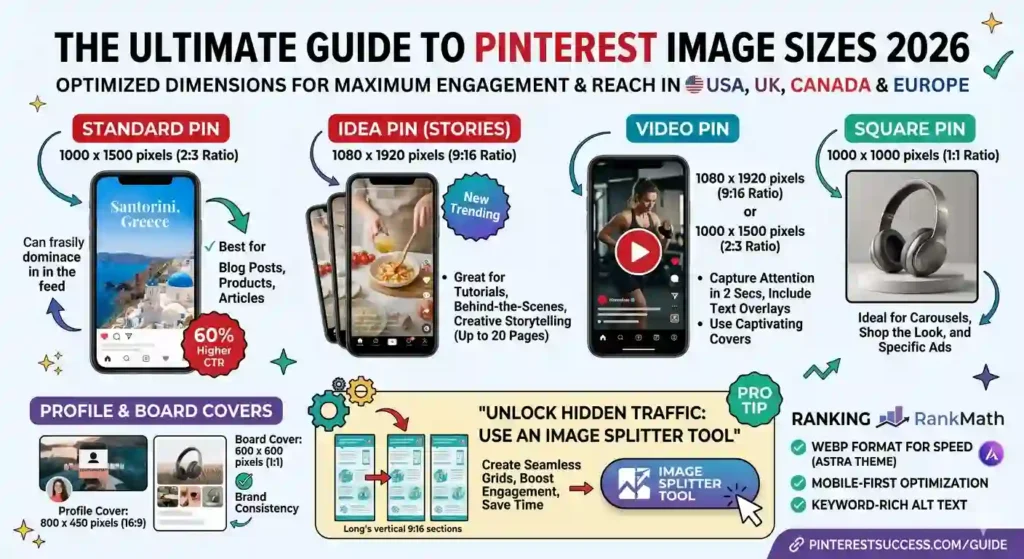
When we talk about Pinterest SEO, many creators focus only on keywords and descriptions. However, Pinterest’s “Visual Lens” technology—an advanced AI—scans every image to determine its category and quality. A pin that adheres to the recommended 2:3 aspect ratio is categorized as “High Quality.” Data shows that pins with optimized dimensions receive up to 60% higher Click-Through Rates (CTR) compared to horizontal or square images that look out of place in the vertical feed.
In 2026, mobile-first design is non-negotiable. Since over 80% of Pinterest users in Europe and North America browse via mobile devices, vertical images occupy the maximum screen real estate. This captures the user’s full attention, reducing “scroll-away” rates and significantly boosting engagement metrics, which Rank Math and Google search engines also reward.
Core Pinterest Image Sizes 2026 for Global Creators
To stay ahead of the curve, you must use the latest dimensions updated for the 2026 interface. Using outdated sizes can result in blurry visuals or awkward cropping. Here are the pillars of Pinterest dimensions:
- Standard Pins: The gold standard remains 1000 x 1500 pixels. This 2:3 ratio ensures your pin looks crisp on both high-end iPhones and desktop displays. While you can go larger (e.g., 2000 x 3000), keeping it at 1000 x 1500 balances file weight and page load speed—a crucial factor for your Astra theme’s performance.
- Square Pins (1:1): Popular for Pinterest Ads and product showcases, 1000 x 1000 pixels is the go-to size. It is particularly effective for “Carousel” pins where users swipe through multiple images.
- Infographic/Long Pins: For educational content, a 1000 x 2100 pixels size works well. However, be cautious: if a pin is too long, Pinterest may “truncate” it in the feed, hiding your call-to-action (CTA) until the user clicks the image.
Unlimited Image Splitter 2026
Create perfect Pinterest grids in seconds. High-resolution output, browser-side execution, and 100% private. No sign-up required.
Open Image Splitter Tool →Mastering Mobile Safe Zones
In the Western market, user experience (UX) is everything. When designing your pins, you must respect the “Safe Zones.” Pinterest overlays various UI elements like the “Save” button at the top and the “Visual Search” icon at the bottom. Avoid placing critical text or your brand logo in these extreme corners. By keeping your message centered and clear, you ensure that your audience can read your content without any UI obstruction, leading to higher conversion rates and better site traffic.
Mastering Idea Pins, Video Trends, and The Multi-Grid Strategy
As we move further into 2026, the Pinterest algorithm has shifted heavily toward “shoppable” and “immersive” content. Static pins are still the backbone, but if you want to dominate the feeds in Canada, the UK, or Europe, you must master Idea Pins and Video Pins. These formats are designed to keep users on the platform longer, and Pinterest rewards creators who use them by pushing their content to the “Today” tab and the top of search results.
The Power of Idea Pins (Multi-Page Storytelling)
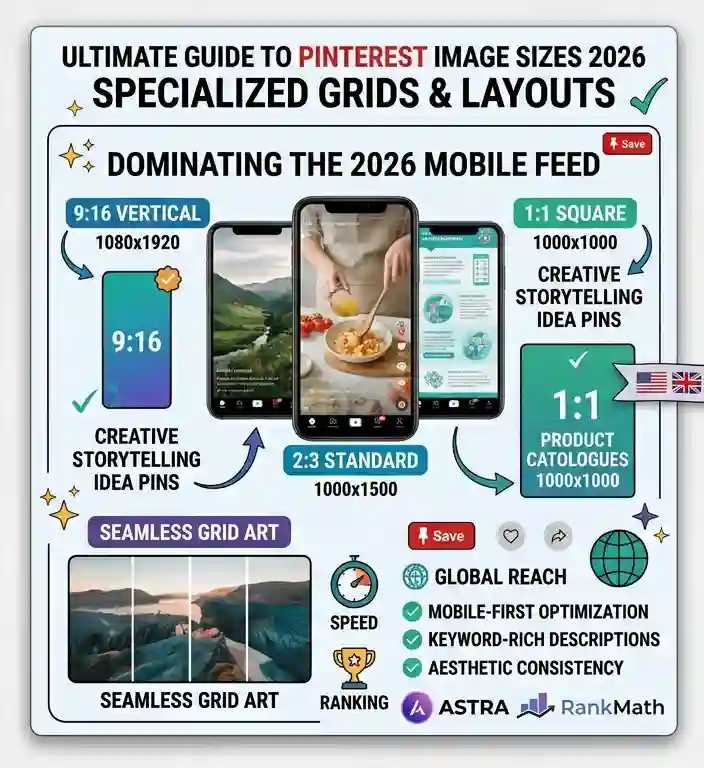
Idea Pins (formerly known as Story Pins) are the secret weapon for organic growth. Unlike standard pins, these allow you to upload up to 20 pages of content. The recommended size is 1080 x 1920 pixels (9:16 ratio).
In Western markets, “How-to” guides and “Step-by-Step” tutorials perform exceptionally well in this format. For example, if you are a home decor blogger in London or a tech reviewer in New York, using all 20 pages to tell a complete story ensures your audience stays engaged. However, there is a technical challenge: how do you keep your aesthetic consistent across so many slides? This is where professional creators use a “Grid” or “Split” strategy.
Why You Need a Reliable Image Splitter Tool
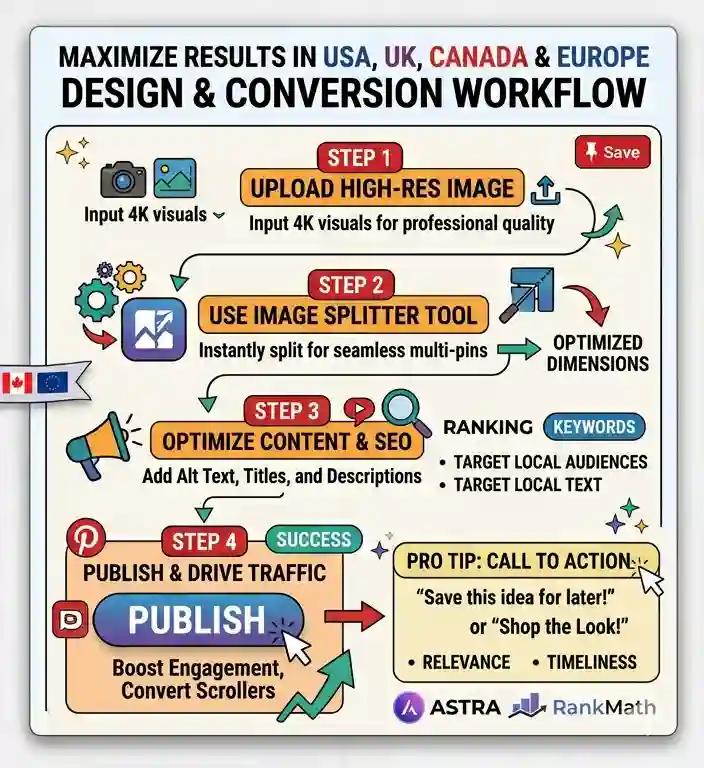
One of the biggest trends in 2026 is the Pinterest Grid Layout. Instead of posting one long, boring image, savvy marketers are now splitting high-resolution images into multiple perfectly sized blocks. This creates a seamless, panoramic experience when a user swipes through your Idea Pin or looks at your Pinterest profile.
If you are manually trying to crop images into equal parts, you are likely losing quality and wasting hours of time. To solve this, using a dedicated [Image Splitter Tool] is a game-changer. A professional tool allows you to take one high-quality 4K image and split it into multiple 1080×1920 sections instantly. This ensures that every “slice” of your image maintains its 100% PageSpeed-friendly resolution while fitting the Pinterest aspect ratio perfectly. For those managing high-traffic blogs on WordPress using the Astra theme, using lightweight, browser-based tools to prepare your assets is the best way to maintain site performance without sacrificing visual impact.
Video Pins: Grabbing Attention in the First 2 Seconds
Video content on Pinterest is booming in the USA. The dimensions remain the same as Idea Pins (1080 x 1920), but the strategy is different. Users in these regions have short attention spans. Your video must deliver the “Hook” within the first 2 seconds.
- Pro Tip: Always use text overlays. Many users browse Pinterest with their sound off while commuting or during work breaks.
- The Technical Side: Keep your video files under 2GB and use .mp4 format. While Pinterest allows videos up to 15 minutes, the “Sweet Spot” for viral ranking in 2026 is between 15 to 30 seconds.
The Aesthetic of the “Split” Profile
When a user clicks on your profile, they should see a cohesive brand. By using an image splitter to create “Grid Art” for your board covers or featured pins, you signal to the algorithm that you are a high-authority creator. This level of professionalism is exactly what helps you outrank thousands of other bloggers who are simply uploading random, unoptimized photos. Whether you are splitting a landscape photo for a travel board or a product shot for an e-commerce site, the goal is “Visual Continuity.”
The Impact of Image Weight on Page Performance
A common mistake among Pinterest marketers is uploading massive, uncompressed 4K images to their blogs. While a Pinterest Image Sizes 2026 guide requires high-quality examples, you cannot sacrifice your site’s PageSpeed. The Astra theme is known for being lightweight, but heavy images will negate its speed benefits.
- WebP is the Standard: In 2026, you should no longer be using heavy PNGs or JPEGs for your blog posts. Converting your images to WebP can reduce file size by up to 80% without losing visual clarity.
- Lazy Loading: Ensure your LiteSpeed Cache or Rank Math settings have “Lazy Load” enabled. This ensures that your Pinterest-sized graphics only load as the user scrolls down, keeping your initial “Largest Contentful Paint” (LCP) score under 1.2 seconds.
Why Tools Matter: The Pinterest Grid Splitter Tool Advantage
As we discussed earlier, creating a cohesive brand identity requires more than just knowing the numbers. When you use a Pinterest grid splitter tool to prepare your content, you are essentially “pre-optimizing” your assets. Instead of uploading one massive file that takes 5 seconds to load, you are splitting that content into smaller, manageable blocks.
For users in the UK or Canada who are browsing on 5G networks, these split images load almost instantly. By providing a link or a recommendation for a high-performance image splitter within your blog, you are giving your readers a functional solution to a technical problem. This increases your “Time on Page,” a metric that tells Google your content is valuable, further boosting your ranking for optimize Pins for mobile searches.
Designing for the “Mobile-First” Index
Google’s mobile-first indexing means the mobile version of your Astra-based blog is the one that determines your rank. Since Pinterest image sizes 2026 are designed for vertical viewing, your blog’s layout must be responsive. Ensure that your image comparison tables and “Pinterest aspect ratio guide” graphics are easy to read on a 6-inch screen. If your tables are too wide or your text is too small, your bounce rate will spike, hurting your SEO efforts in the European and North American markets.
Implementing the Pinterest Image Sizes 2026 Strategy for Viral Success
Knowing the technical dimensions is only half the battle; the real challenge for creators in the USA, UK, and Canada is the execution. To dominate the 2026 Pinterest algorithm, you must move beyond simple uploads and start thinking like a professional digital architect. By following this Pinterest aspect ratio guide, you have already set the foundation. Now, it is time to focus on the advanced tactics that convert casual scrollers into loyal blog followers and customers.
Why Your Content Needs a Pinterest Grid Splitter Tool in 2026
In high-income markets, the “aesthetic” of a Pinterest profile is what builds trust. If a user in Europe clicks on your profile and sees a messy, unorganized feed, they are unlikely to click your website link. This is why the Pinterest grid splitter tool has become a mandatory part of a professional workflow.
Instead of presenting a single, cramped image, you can take a high-resolution 4K visual and split it into a 3×3 or 2×2 grid. This strategy allows you to:
- Increase Screen Real Estate: Your brand dominates the user’s feed as they scroll through multiple related tiles.
- Improve Image Quality: By splitting images, you avoid the heavy compression Pinterest applies to large, singular files.
- Boost Engagement: Users are more likely to “Save” an entire series of beautiful, split images than a single generic pin.
By integrating a dedicated image splitter into your routine, you ensure that every slice of your content perfectly matches the Pinterest Image Sizes 2026 standards. This is the “secret sauce” used by top-tier agencies in New York and London to maintain a premium brand image without spending thousands of dollars on manual graphic design.
Unlimited Image Splitter 2026
Create perfect Pinterest grids in seconds. High-resolution output, browser-side execution, and 100% private. No sign-up required.
Open Image Splitter Tool →Final Steps to Optimize Pins for Mobile Users
As you finalize your Pinterest strategy, remember that your Astra-themed WordPress blog must serve as a seamless extension of your Pinterest presence. When you optimize Pins for mobile, you aren’t just looking at the Pinterest app—you are looking at the landing page experience. If a user clicks a pin and lands on a page that isn’t mobile-optimized, your bounce rate will skyrocket, damaging your Rank Math SEO score.
Always double-check that your social media image dimensions are consistent across your entire site. For example, if you use a 2:3 ratio for your Pinterest pins, consider using a similar visual style for your “Featured Images” on WordPress. This creates a “Visual Loop” that keeps the user engaged from the moment they see your pin until they reach the bottom of your blog post.
Conclusion: Staying Ahead of the Pinterest Algorithm
The digital landscape moves fast, and Pinterest is no exception. While Pinterest Image Sizes 2026 are the current gold standard, the most successful bloggers are those who prioritize speed, precision, and user experience. By combining the power of the Astra theme for speed, Rank Math for search visibility, and a high-performance Image Splitter tool for visual brilliance, you are positioning yourself at the top of the global market.
Don’t let your hard work go to waste with blurry, poorly cropped images. Start using professional tools today to ensure your visuals are as sharp as your SEO strategy. Whether you are targeting a niche audience in Toronto or a broad market across Europe, the rules remain the same: Be vertical, be high-res, and always be optimized.
While following our Pinterest Image Sizes 2026 guide will give you a significant advantage, it is always a professional practice to stay aligned with the platform’s core developer standards. For those who want to deep-dive into how the algorithm processes high-resolution uploads and creative metadata, we highly recommend reviewing the official Pinterest Creative Best Practices. Aligning your visual strategy with these official guidelines, combined with a precise Pinterest aspect ratio guide, ensures that your content remains future-proof against any sudden algorithmic shifts in the USA and European markets.
Frequently Asked Questions (FAQ)
What is the best Pinterest image size for 2026?
The gold standard for Pinterest in 2026 is 1000 x 1500 pixels with a 2:3 aspect ratio. This size ensures your content looks professional, crisp, and takes up the maximum vertical space in the mobile feed, which is crucial for capturing attention in competitive markets like the USA and UK.
Why does Pinterest crop my images in the feed?
Pinterest typically crops images that exceed an aspect ratio of 1:2.1. For example, if you upload a very long “tall” pin (like 1000 x 2100 px), the algorithm may hide the bottom part in the preview. To avoid this and ensure your call-to-action is visible, stick to the recommended 1000 x 1500 px dimensions.
Are square images (1:1) effective for Pinterest marketing in 2026?
While Pinterest supports 1000 x 1000 pixels (1:1), they are generally less effective than vertical pins. Square images take up less screen real estate on mobile devices, leading to lower engagement. However, they are still a great choice for Pinterest Carousel ads and product showcases.
How can I create a seamless grid layout on Pinterest?
Creating a seamless grid involves splitting one high-resolution image into multiple parts (e.g., 3 blocks of 1080 x 1920). The most efficient way to do this without losing quality is by using a specialized Pinterest grid splitter tool. This ensures each “slice” aligns perfectly with the 2026 mobile UI.
Does image file size affect Pinterest ranking?
Yes, absolutely. While Pinterest allows files up to 20MB, the high-speed standards in Europe and North America mean you should aim for under 5MB. Using lightweight formats like WebP helps your pins load instantly on your WordPress blog (especially with the Astra theme), which improves both user experience and SEO ranking.